Build and convert
bubble-convert
Convert one chapter, all chapters, or an arbitrary Markdown file.
# Chapter by number
bubble-convert 1
bubble-convert              # all chapters

# Options
bubble-convert 1 --style square --template lulu_7x10
bubble-convert 1 --style circle --chapter-opener-size 5
bubble-convert 1 --lang cn
bubble-convert 1 --main-font "EB Garamond" --body-font-pt 11
bubble-convert 1 --optimize-pdf --optimize-pdf-quality ebook

# Non-chapter Markdown
bubble-convert margins/poem.md --format docx
Chapter styles
--style |
Description |
|---|---|
circle |
Quarter-circle chapter number |
square |
Blue square |
none |
Plain chapter opening |
Chapter opener size
--chapter-opener-size CM sets the opener badge size (square side or circle radius) and scales the chapter numeral font. Default: chapter_opener_size_cm in peanut.config (4 cm).
bubble-build --style square --chapter-opener-size 5
bubble-convert 1 --chapter-opener-size 4.5
Output formats
Default is PDF. Alternatives:
bubble-convert 1 --format epub
bubble-convert 1 --format docx
EPUB and DOCX use Pandoc (no LaTeX). Mermaid diagrams are rendered to PNG in all export formats, including EPUB and DOCX. Layout may differ from PDF.
Child process timeouts
Every Pandoc/LaTeX/Typst subprocess bubble-convert shells out to is bounded by a timeout so a stuck engine can't hang the build forever. Set PEANUTBOOK_CHILD_TIMEOUT_SECONDS (or BUBBLE_CHILD_TIMEOUT_SECONDS) to override the default of 240 seconds; use 0 to disable it while debugging a genuinely long compile. On timeout, the whole process tree for that step is killed and the LaTeX engine loop does not fall back to a direct Pandoc retry (which would just repeat the same hang).
PEANUTBOOK_CHILD_TIMEOUT_SECONDS=600 bubble-convert 1
This is the CLI's own per-step timeout. The VS Code extension additionally bounds the whole bubble-convert invocation with its own peanutbook.buildTimeoutSeconds setting.
bubble-convert-parts
Build part divider pages (Part I, II, …) as standalone PDFs from partN.md. These are separate from chapter title pages and use a dedicated LaTeX/TikZ layout.
bubble-convert-parts              # all part*.md under the project
bubble-convert-parts 1            # Part I only (finds chapter*/part1.md)
bubble-convert-parts part2
Place each partN.md in the first chapter folder of that part (for example chapter1-topic/part1.md). Output is written beside it as part1.pdf.
Part overview mindmap (page 2)
Optional companion assets in the same chapter’s img/ folder:
| File | Role |
|---|---|
img/partN_mindmap.json |
Part-level mindmap layout |
img/partN_mindmap.py |
render_mindmap(__file__) |
img/partN_mindmap.png |
Generated overview figure |
When present, bubble-convert-parts regenerates the PNG and appends it as page 2 of partN.pdf (mindmap only; no separate overview title).
Part markdown format
# Part I: Linear Spaces and Representations

**Chapters 1–10**

*Optional subtitle (italic lines)*

> Featured quote

Body paragraphs after the quote.
When it runs
| Command | Part PDFs |
|---|---|
bubble-convert-parts |
Generates only (manual refresh) |
bubble-build (PDF) |
Runs bubble-convert-parts automatically, then merges via \includepdf |
bubble-batch (PDF) |
Same as bubble-build for each full-book variant |
bubble-build --format epub/docx/html |
Skipped (print PDF only) |
Typical workflow: edit partN.md → bubble-convert-parts (optional; full PDF builds do this for you) → bubble-build.
bubble-build
Assemble the full book from all chapters, preface, appendix, covers, and TOC. For PDF output, part divider PDFs are regenerated from partN.md via bubble-convert-parts before chapters are merged (see above).
bubble-build
bubble-build --style square --max-chapters 21
bubble-build --lang cn --optimize-pdf
bubble-build --cover 7x10-packt
bubble-build --no-cover --style none
bubble-build --format epub
bubble-build --format docx --lang cn    # book_zh.epub
bubble-build --format html              # book_html/
bubble-build --format html --lang cn    # book_html_zh/
EPUB Pipeline Features
When exporting EPUB (bubble-build --format epub):
- 1-to-1 Chapter File Naming: Formal chapters map directly to matching file numbers (ch001.xhtml for Chapter 1, ch019.xhtml for Chapter 19).
- Semantic Frontmatter / Backmatter: Named as cover.xhtml, copyright.xhtml, preface.xhtml, foreword.xhtml, appendix.xhtml, about.xhtml.
- Image Attributes: {width=...}, {height=...}, {alpha=...}, {rotate=...}, and alignment classes are converted to clean HTML/CSS inline styles via epub_image_attributes.lua.
- Cross-References: Powered by scripts/epub_crossrefs.lua and i18n.json for multilingual chapter jump links and unlinked figure numbers.
Notable flags
| Flag | Effect |
|---|---|
--chapter-opener-size |
Opener badge size in cm (square/circle geometry + chapter numeral font); overrides chapter_opener_size_cm |
--format html |
Static HTML site instead of PDF (see below) |
--no-cover |
Interior-only; output name gets _interior suffix |
--optimize-pdf |
Shrink PDF (GS for en/sp, qpdf for CJK) |
--protect |
Anti-copy rasterization (large files) |
--include-appendix |
true, false, or auto |
--with-time |
Timestamp in output filename |
Output naming
| Locale | Style | Example PDF |
|---|---|---|
en |
square | book_square.pdf |
cn |
square | book_zh_square.pdf |
en |
none, no cover | book_none_interior.pdf |
Chapter figure generation (img/*.py)
Before merging chapters, bubble-build scans every chapterN-topic/img/ folder for *.py files and runs each one to generate its figure.
- Naming convention: a script
foo.pymust save its output asfoo.pngin the sameimg/directory (same stem as the script). The build looks for<script_stem>.pngnext to the script. - Caching: if
<script_stem>.pngalready exists, the script is skipped — regeneration only happens when the PNG is missing. Delete the PNG to force that figure to rebuild. - Exception:
gram_matrix.pyis hardcoded to produce two images,gram_matrix1.pngandgram_matrix2.png; both must exist to be skipped. - Each script runs with its
img/directory as the working directory, using theconda_envinterpreter (see Configuration) if set, else systempython3. - Only
bubble-build(whole-book merge) runs this step;bubble-convert(single chapter) does not — figures for a chapter previewed on its own must already exist as PNGs.
Recommended script pattern (mirrors the required naming convention):
import os
# ... build the figure ...
script_dir = os.path.dirname(os.path.abspath(__file__))
script_name = os.path.splitext(os.path.basename(__file__))[0]
output_path = os.path.join(script_dir, f'{script_name}.png')
plt.savefig(output_path, dpi=300, bbox_inches='tight', facecolor='white')
Peanutbook itself ships no such helper — this is a plain matplotlib pattern, not a bubble API. If your project has a shared plotting package, wrap it in a one-liner instead, e.g. save_figure_to_script_dir('output.png', dpi=300, bbox_inches='tight', caller_file=__file__).
bubble-render-html
Build a static HTML book site (same sources as PDF, no LaTeX):
bubble-render-html
bubble-render-html --lang cn
bubble-render-html -o dist/html
bubble-render-html --theme dark --no-mathjax
bubble-render-html --max-chapters 21
bubble-render-html --cover 7x10
| Flag | Effect |
|---|---|
--lang |
Locale (en, cn, tc, jp, sp) |
-o, --output |
Output directory |
-t, --title |
Site title (default: book_title from config) |
--theme |
default, dark, or minimal |
--css |
Custom CSS → assets/custom.css |
--no-mathjax |
Disable MathJax |
--max-chapters |
Limit chapter count |
--include-appendix |
true, false, or auto |
--cover |
Cover folder under cover/ |
Default output: book_html/ or book_html_{tag}/. Full details: HTML generation.
bubble-merge
Merge chapter Markdown into review-friendly single files:
bubble-merge
bubble-merge --en-only
bubble-merge --zh-only
bubble-merge --lang tc
Default: auto-detect languages via locales.langs_for_merge; warns on partial translations.
bubble-proposal
Single Markdown → proposal PDF (Pandoc + LuaLaTeX/XeLaTeX):
bubble-proposal querytracker/proposal.md --lang en --style square
bubble-proposal notes/sample.md --lang cn --optimize-pdf
YAML front matter (title, author, runtitle, …) enables full U.S. proposal title page layout. Without title, output uses compact article style.
bubble-paper
Single Markdown → academic paper PDF (Pandoc + LuaLaTeX):
bubble-paper --init
bubble-paper paper.md --papersize a4
bubble-paper paper.md --two-column --optimize-pdf
YAML front matter: title, author, affiliation, abstract, keywords, bibliography (path to .bib for --citeproc). Uses templates/paper_style.tex.
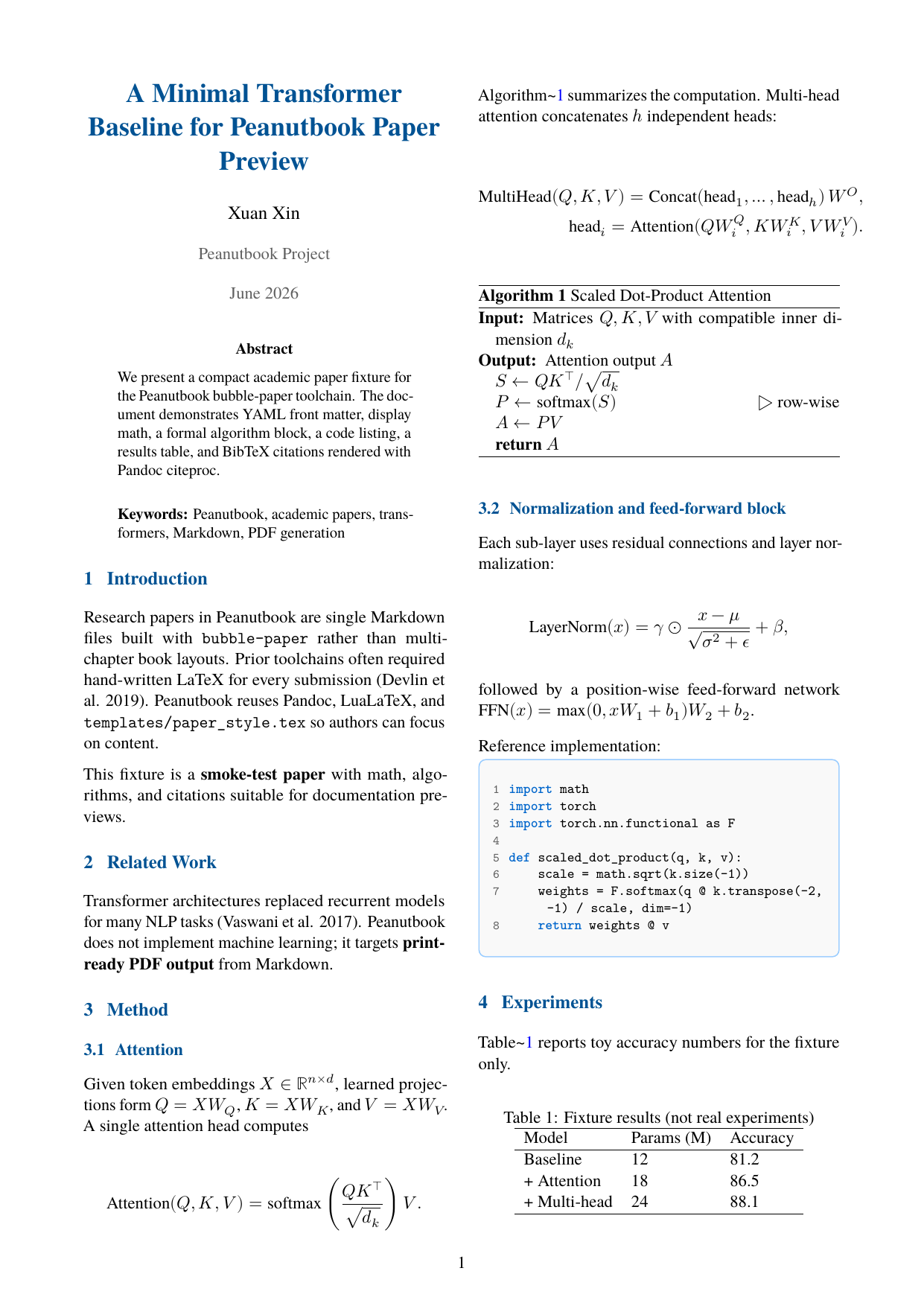
Full guide with layout screenshots: Academic papers (bubble-paper).
bubble-bizplan
Single Markdown → business plan PDF (Pandoc + LuaLaTeX). Uses peanut-biz.config, not peanut.config.
bubble-bizplan --init bizplan.md
bubble-bizplan bizplan.md --cover-name tech-white --strict
bubble-bizplan bizplan.md --check-only
Full guide: Business plans (required sections, cover styles, config keys, Python API).
bubble-monitor
Watch files and rebuild on save:
bubble-monitor 1 2 3
bubble-monitor --lang tc 1
Requires watchdog (installed with bubble).
bubble-scaffold
Interactive project bootstrap:
bubble-scaffold
bubble-scaffold --chapters 10 --lang both --yes
bubble-scaffold --lang zh --yes
bubble-scaffold --bizplan
bubble-scaffold --paper
Creates chapter stubs, peanut.config, and cover/7x10/ placeholders. With --bizplan, scaffolds bizplan.md. With --paper, scaffolds paper.md.
bubble-split-pdf
Split a built PDF into N parts (e.g. for platform upload limits):
bubble-split-pdf book_zh_square.pdf -n 5
bubble-split-pdf --dry-run
Requires qpdf; page count from pdfinfo or PyPDF2.