Academic papers (bubble-paper)
Peanutbook includes a workflow for research and academic papers: one Markdown file → PDF with article layout, title block, abstract, keywords, and optional bibliography.
This path uses the bubble-paper command. It does not use chapter folders, peanut.config, or book print templates.
PDF previews
The screenshots below come from the sample fixture tests/fixtures/sample_paper.md in the peanutbook source repository (author Xuan Xin). Regenerate them with ./scripts/test_sample_paper.sh.
Single column (default)
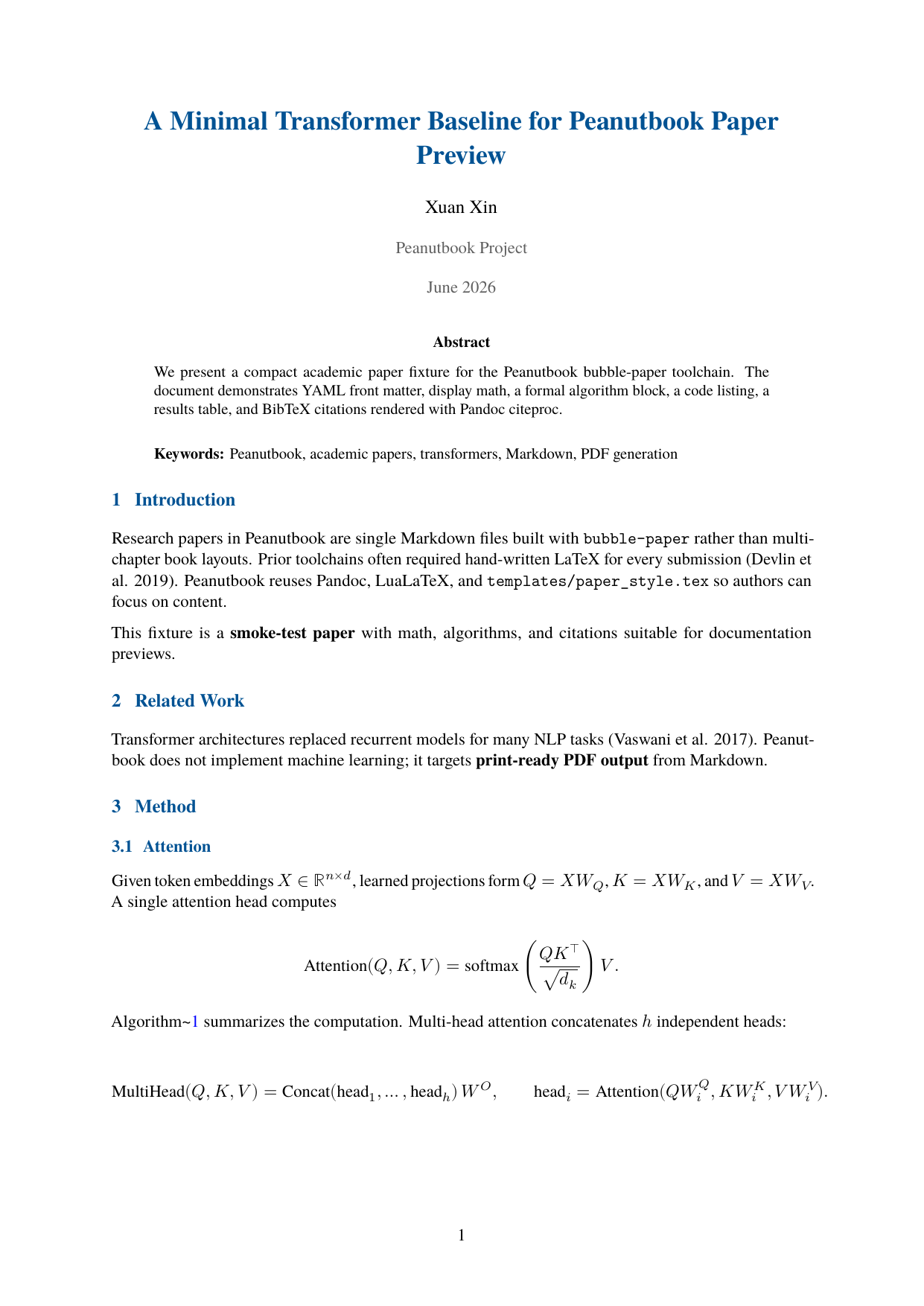
Page 1: centered title block, abstract with keywords, numbered sections.
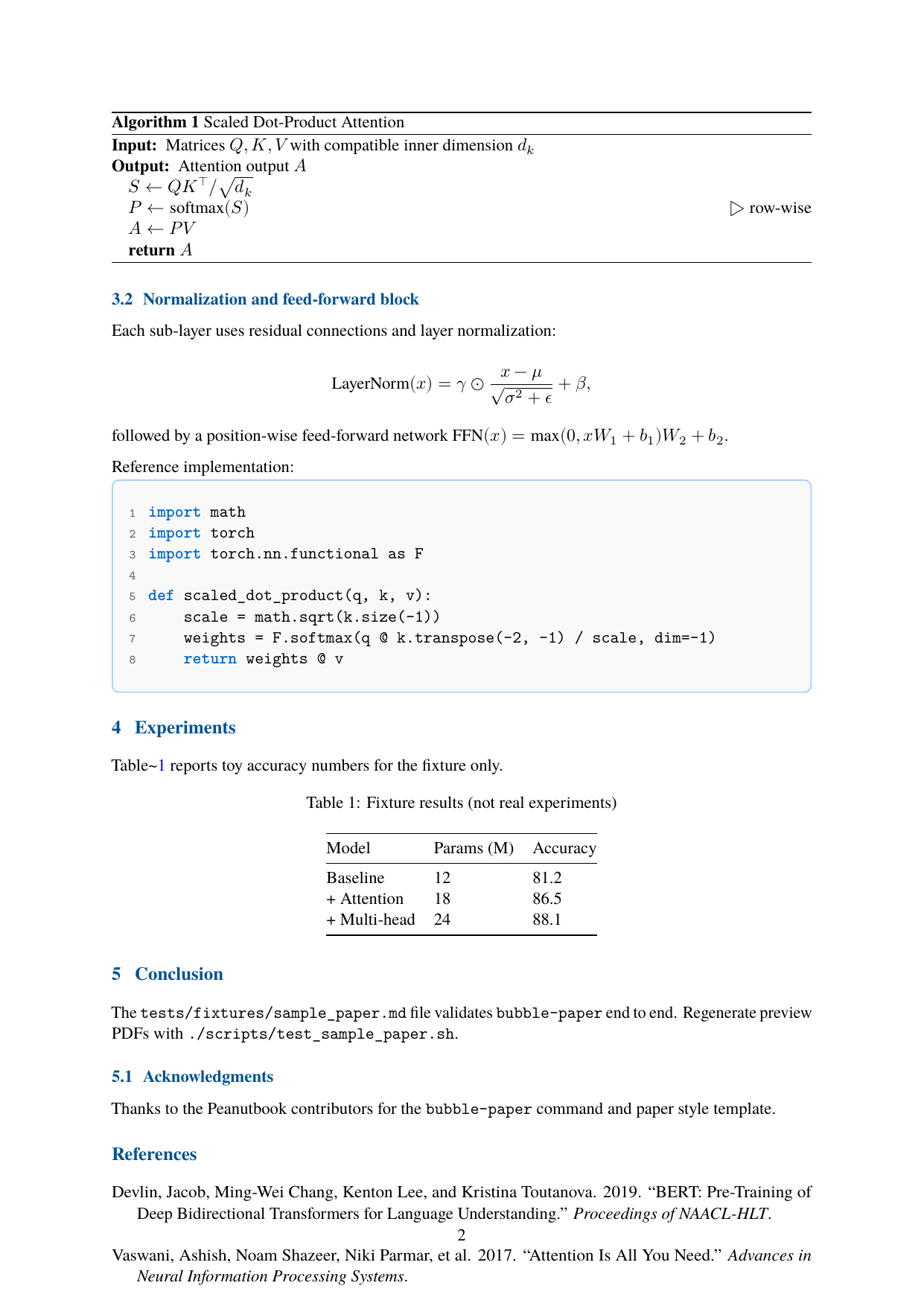
Page 2: display math, algorithm block, Python listing with line numbers, table, and references.
Two column (--two-column)
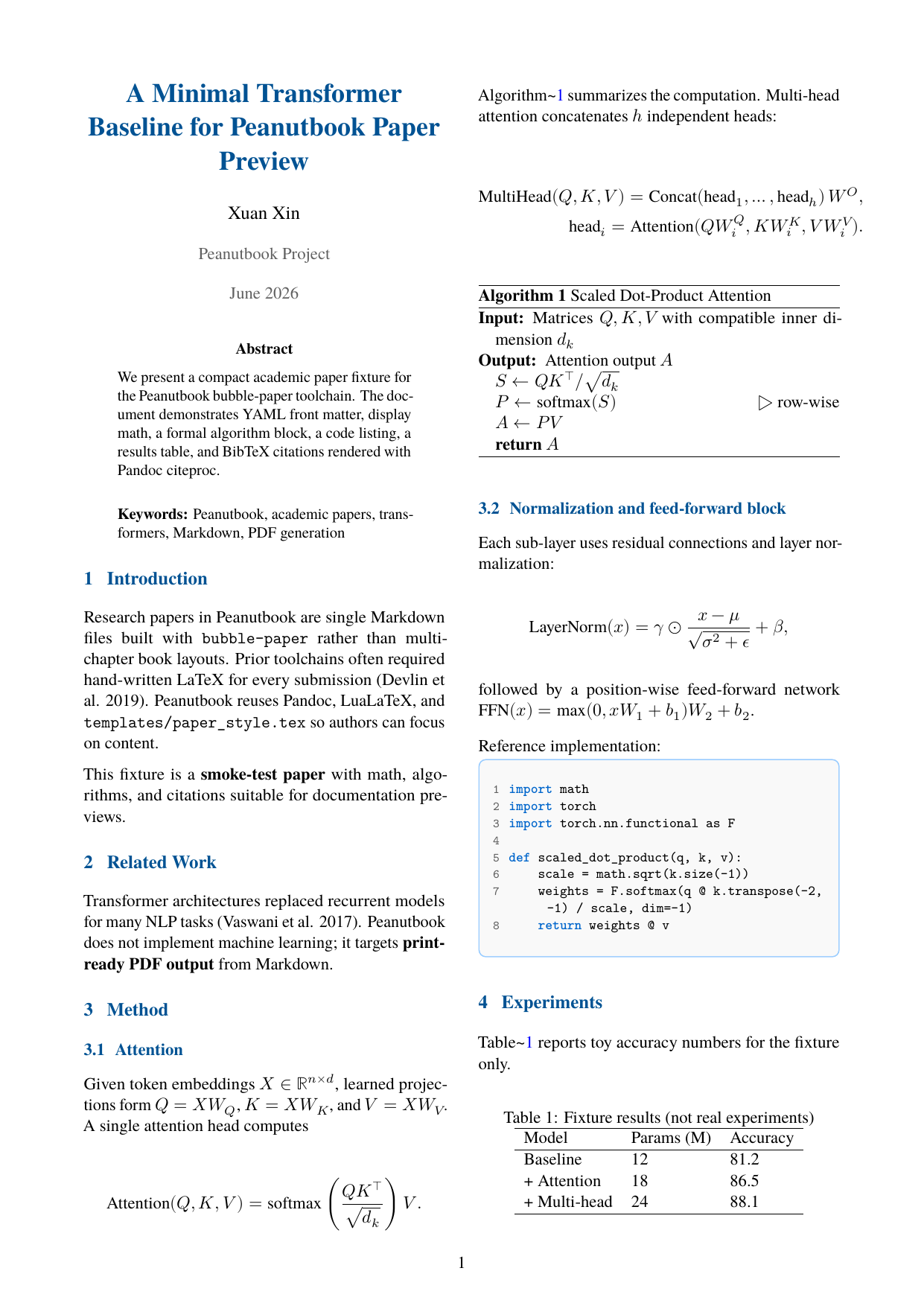
Page 1: same metadata as single-column; introduction and related work in two columns.
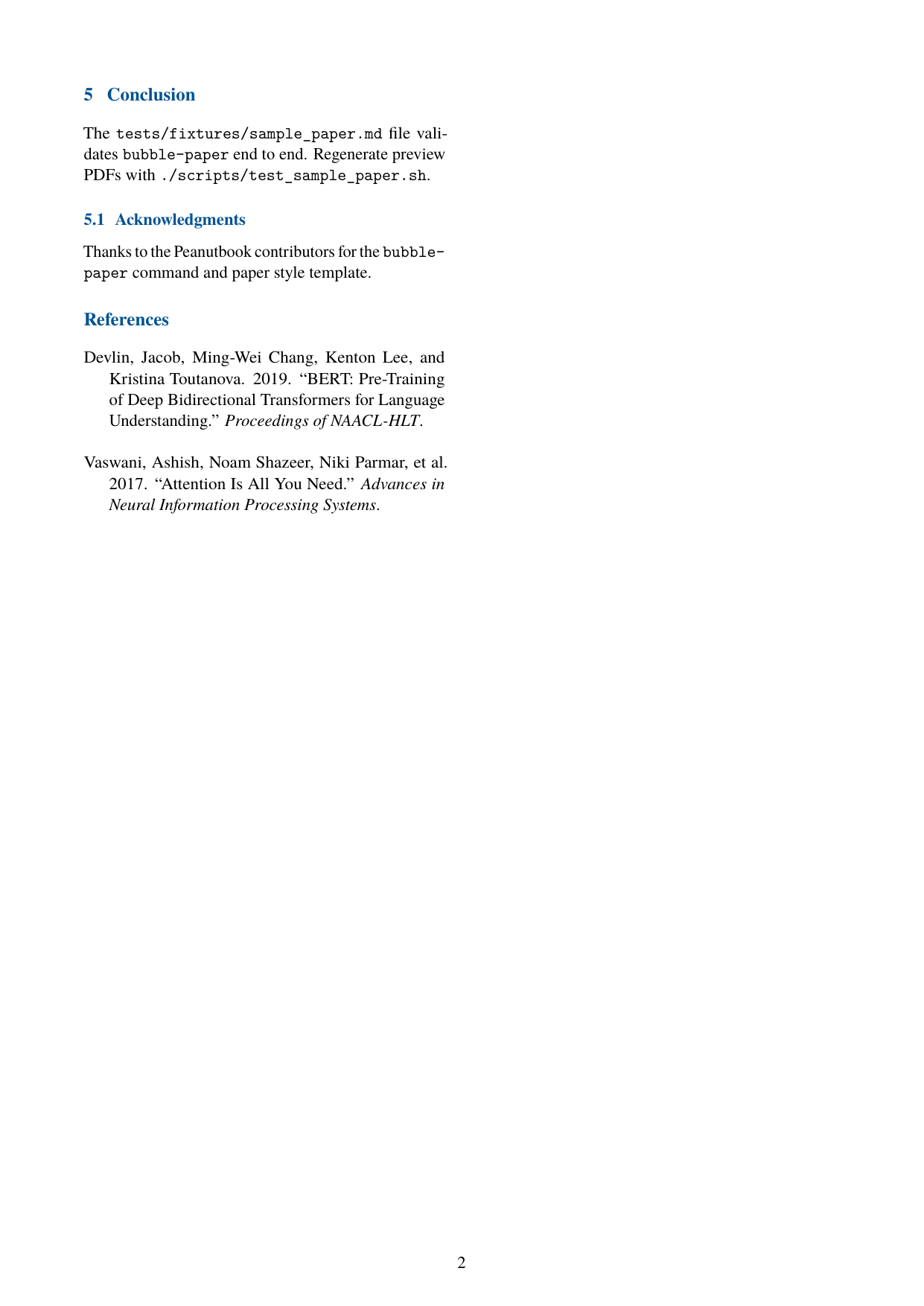
Page 2: equations scaled or split for column width, floating table, numbered code blocks.
Quick start
bubble-paper --init              # scaffold paper.md in cwd
# edit paper.md (YAML front matter + sections)
bubble-paper paper.md              # build PDF next to the .md file
Alternative scaffold:
bubble-scaffold --paper
Two-column layout:
bubble-paper paper.md --two-column
Command reference
| Flag | Effect |
|---|---|
markdown |
Input .md path (required unless --init) |
-o, --output |
Output PDF path (default: same basename as input) |
--init |
Write bundled paper.md template to cwd |
--lang |
Document language (en, cn, tc, jp, sp) — CJK uses LuaLaTeX + luatexja |
--papersize |
a4 (default) or letter |
--two-column |
Two-column article layout |
--template |
Optional custom Pandoc LaTeX template |
--optimize-pdf |
Shrink PDF with Ghostscript (or qpdf for CJK) when output is large enough |
--optimize-pdf-quality |
screen, ebook, printer, prepress (English Ghostscript only) |
--style |
Ignored (accepted for script compatibility with bubble-build) |
Examples:
bubble-paper paper.md --papersize a4
bubble-paper paper.md --two-column --optimize-pdf
bubble-paper paper.md --lang cn
YAML front matter
Optional YAML at the top of the Markdown drives the title page and metadata:
---
title: "Paper Title"
author: "Author Name"
affiliation: "Department, University"
date: "\\today"
abstract: |
  Summarize the problem, approach, and main results.
keywords: "machine learning, NLP, evaluation"
bibliography: references.bib
layout: two-column   # optional; same as --two-column
---
| Key | Purpose |
|---|---|
title |
Paper title (centered on title block) |
author |
Author name(s) |
affiliation |
Institution or department (shown under author) |
date |
Publication date (LaTeX \\today or a fixed string) |
abstract |
Abstract paragraph (use \| block scalar for multiple lines) |
keywords |
Keyword line printed after the abstract |
bibliography |
Path to a .bib file (enables Pandoc --citeproc) |
layout |
two-column / twocolumn instead of --two-column flag |
Suggested structure
The bundled template includes typical sections:
- Introduction
- Related Work
- Method
- Experiments
- Conclusion
- Acknowledgments (optional subsection)
- References (filled when
bibliographyis set)
Sections are numbered automatically (--number-sections). Use standard Peanutbook Markdown for figures, math, tables, and code blocks — see Syntax reference.
Bibliography
When bibliography: references.bib is set and the file exists next to the Markdown (or at the given path), bubble-paper runs Pandoc with --citeproc. Add citation keys in the body:
Prior work [@smith2020] showed ...
PDF styling
bubble-paper includes templates/paper_style.tex and templates/paper_code_style.tex via Pandoc -H:
| Feature | Single column | Two column |
|---|---|---|
| Body font | Serif (TeX Gyre Termes or Latin Modern Roman) | Same |
| Headings | Blue title and section headings | Same |
| Margins | 1 inch | 0.75 inch |
| Column gutter | — | 0.3 inch (\columnsep) |
| Code blocks | Listings + line numbers | Smaller type; math/tables auto-fit column width |
| Abstract | Abstract block + Keywords line | Title/abstract full width; body twocolumn |
For book proposals, use bubble-proposal. For business plans, see Business plans.
Algorithms and math
Display equations, multi-line align, and formal algorithm blocks are supported:
$$
\mathrm{Attention}(Q, K, V) = \mathrm{softmax}\left(\frac{QK^\top}{\sqrt{d_k}}\right)V .
$$

```{.algorithm caption="Scaled Dot-Product Attention" label="alg:attention"}
\Require Matrices $Q, K, V$ with compatible inner dimension $d_k$
\Ensure Attention output $A$
\State $S \gets Q K^\top / \sqrt{d_k}$
\State $P \gets \mathrm{softmax}(S)$ \Comment{row-wise}
\State $A \gets P V$
\State \Return $A$
```
scripts/algorithm_blocks.luaconverts{.algorithm …}fences to LaTeXalgorithmenvironments.- Cross-references:
Algorithm~\ref{alg:attention}(raw LaTeX). - Two-column builds use
scripts/paper_twocolumn_math.luato split wide equations and shrink overflow. - Two-column tables use
scripts/paper_floating_tables.lua(floatingtableinstead oflongtable).
Code listings
Fenced code blocks render with syntax highlighting, a light border, and left line numbers by default:
def scaled_dot_product(q, k, v):
    scale = math.sqrt(k.size(-1))
    weights = F.softmax(q @ k.transpose(-2, -1) / scale, dim=-1)
    return weights @ v
Per-block opt-out: put #NOLINENUM on the first line inside the fence (same as books).
Python API
from pathlib import Path
from bubble.paper import build_paper_pdf

build_paper_pdf(
    Path("paper.md"),
    Path("paper.pdf"),
    lang="en",
    papersize="a4",
    two_column=False,
    optimize_pdf=False,
)
build_paper_pdf returns 0 on success, non-zero on failure. CLI equivalent: bubble-paper.
Sample fixture
| File | Purpose |
|---|---|
tests/fixtures/sample_paper.md |
End-to-end sample (math, algorithm, code, table, citations) |
tests/fixtures/sample_paper.bib |
BibTeX for --citeproc |
scripts/test_sample_paper.sh |
Builds PDFs and documentation PNGs |
# In the peanutbook repo
./scripts/test_sample_paper.sh

# Also copy PNGs to peanutbook-docs (optional)
PEANUTBOOK_DOCS=/path/to/peanutbook-docs ./scripts/test_sample_paper.sh
PNG (in docs/img/) |
Contents |
|---|---|
paper-preview-single.png |
Single-column page 1 |
paper-preview-single-method.png |
Single-column page 2 (method) |
paper-preview-twocol.png |
Two-column page 1 |
paper-preview-twocol-method.png |
Two-column page 2 (method) |
See also
- Build & convert —
bubble-paper— short CLI summary - Command reference overview
- System requirements — Pandoc, LuaLaTeX